
Lime e-bike and e-scooter sharing support the City’s vison in the Transportation Master Plan (TMP) to improve travel choices and mobility. Learn how to use them safely and park them correctly to get to where you’re going.
These vehicles may use roadways, bicycle lanes, and trails because they travel faster than pedestrians. When drivers are sharing a lane with a bicycle or scooter, they should slow to the bike or scooter’s speed before passing and pass only when safe, leaving at least 3 feet of clearance.
Lime riders should keep these safety and courtesy considerations in mind:
- Wear a helmet and check your vehicle before every ride.
- Follow traffic laws and ride where permitted.
- Watch your speed and stay alert at intersections.
- Respect pedestrians by yielding, slowing down, and passing with care.
- Keep your phone away and never ride under the influence.
- Park responsibly in designated areas without blocking sidewalks, ramps, entrances, or bus stops.
- Be considerate of other riders, drivers, and everyone sharing public spaces.
Experiencing issues with Lime? Contact Lime Directly: email Lime Support support@li.me or call/text 1-888-546-3345. You can also submit an issue via Request for Service.
How to Start Your Ride:
- Download the App: To download the Lime app, simply click here and scan the QR code to be directed to the appropriate download page for your mobile device. You can also search “Lime” in the App Store or Google play store.
- Create an account: You’ll need to provide a valid phone number or email address and a form of payment.
- Find a Lime near me: Open the Lime app to see available Limes in your area. If you don’t see any Lime icons displayed on the map, zoom out to search a wider area.
- Starting your ride:
- Locate the Lime you’d like to use. You can also use the map in the app to locate nearby vehicles.
- If you locate a vehicle on the map, tap Reserve to hold it for 10 minutes.
- When you get close to your reserved vehicle, you’ll see a Start ride option on the app.
- If you don’t see a Start ride option in the app or have not reserved a vehicle, click Scan to start and scan the QR code on the vehicle or manually enter the 6-digit code located beneath the QR code.
How to Ride a Lime eScooter in Redmond:
Follow the steps below to get started on an eScooter. More of a visual learner? Check out this video!
- Place your front foot firmly on the baseboard of the e-scooter.
- Use your back foot to push off from the ground to get the e-scooter moving.
- Once in motion, slowly press down on the throttle to begin accelerating.
- Gently squeeze the brake levers to slow down or come to a stop.
- Use your foot to put the kickstand down to park the e-scooter.
More tips to help you be a pro in no time:
- Using the kickstand: Sweep the kickstand up with your foot before riding. Put the kickstand down when parking.
- Using the throttle: Ensure the throttle springs back after you press and release. The vehicle must be moving for the throttle to engage the motor.
- Getting moving: Place one foot on the vehicle’s floorboard. Push off the ground using your other foot while pressing the throttle.
- Keeping yourself and your city safe: Wear a helmet when riding. Test the brakes before riding by squeezing the levers and rocking the e-scooter forward and back—the e-scooter should not move. Ride in bike lanes whenever possible.
- Parking responsibly: Park out of public pathways and upright with the kickstand down. You may be fined for improper parking.
How to Ride a Lime e-bike in Redmond:
Follow the steps below to get started on an eBike. More of a visual learner? Check out this video!
- Release the kickstand. If your vehicle has a throttle, releasing the kickstand allows the throttle to engage.
- Pull the seat lever to adjust the seat height. The seat should be level to the top of your hip bone.
- Close the lever to lock the seat into position.
- Start pedaling, and the electric motor will engage. If your e-bike has a throttle, you can press it down to accelerate.
How to Ride a LimeGlider in Redmond:
- Release the kickstand to allow the throttle to engage.
- To accelerate, slowly apply pressure to the throttle. Once moving, lift your feet off the ground and go.
How to End your Ride
Ending your ride:
- As you approach your destination, locate the nearest parking pin on the map. For safety, always come to a complete stop, safely away from traffic, when you use your mobile phone.
- Ride your vehicle to the parking pin’s location to park.
- Tap End Ride and follow the prompts to take a photo of your parked vehicle.
Make sure to park your vehicle according to city rules. Your vehicle must be upright and with the kickstand down, not blocking pedestrian pathways, building entrances or driveways.
While other vehicles may be parked nearby, they may not be parked correctly at the parking pin — make sure to use the app for guidance. You may be subject to a warning or penalty if your vehicle is incorrectly parked.
You can find information on local parking rules in the Lime App. Tap the parking pin on the map and select Learn more about zones and parking.
Issues ending your ride
Check the following if you experience difficulties ending your ride.
- Check your location. If you have arrived at your parking spot but can’t end your ride, check you are close enough to the pin on the Lime app. GPS accuracy can vary based on your network and location, so move as close as possible to the parking pin and try again.
- Check your internet connection. Verify you have a stable internet connection on your mobile phone. If you’re connected to wi-fi, try switching to mobile data.
How to Park Lime Vehicles
- Park away from pedestrian walkways and ensure the vehicle is standing upright.
- Keep vehicles from blocking sidewalks and curb ramps, leaning against buildings, or obstructing bus loading zones.
- Do not park in motorcycle or vehicle parking stalls or driveways.
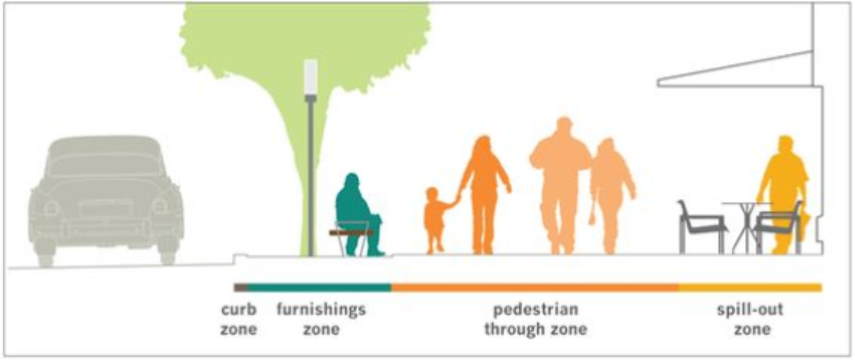
Vehicles should be parked upright in the ‘furnishings zone’: